API Workflow
Authentication
The BUILD API uses Api Key and Api Secret to authenticate requests. You can view and manage your API keys in the BUILD Dashboard.
Your API keys and secrets carry many privileges, so be sure to keep them secure. Don't share them in publicly accessible areas such as GitHub, client-side code, and so forth.
You should use them to get access token by the /v1/auth endpoint. Extract the token from the response payload. You will need to submit your access token via the Authorization header with all subsequent API calls.
Your access token will be valid for a length of time (in seconds) indicated by the expired_in field in the response. When it expires, you'll need to request a new one.
A sample test access token is included in all the examples here, so you can test any example right away. Don't submit any personally identifiable information in requests with this token. To test requests using your account, replace the sample access token with your actual API key or sign in.
Create Payment
- Endpoint:
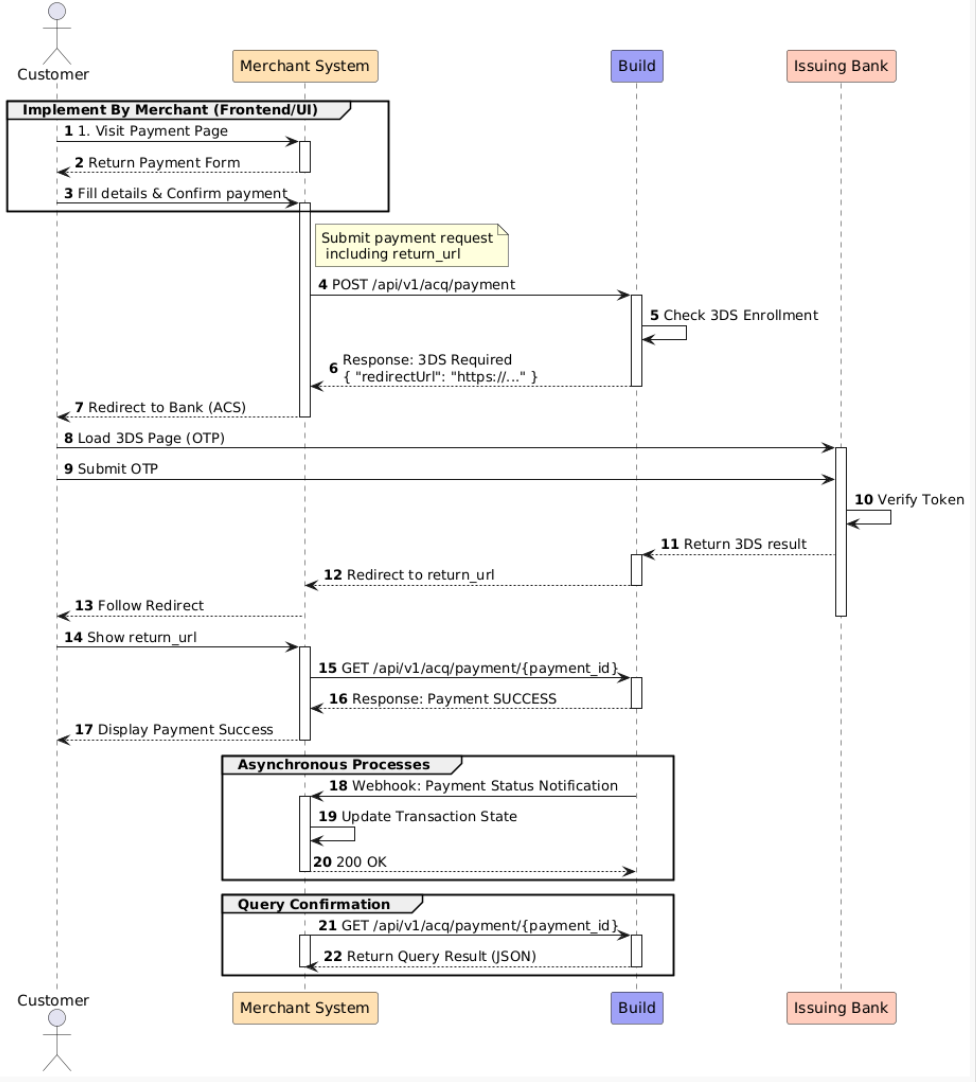
POST /api/v1/acq/payment. - Overview: This is the entry point for all transactions. It initiates a payment request and determines the necessary next steps based on the risk analysis and card type.
- Use Case: Call this API when the customer clicks "Pay" on your checkout page. It supports both standard card payments and transactions requiring 3D Secure (3DS) authentication.
The Payment Lifecycle: Since this API handles both synchronous and asynchronous flows, your integration must handle different payment_status responses:
Immediate Success (PROCESSING): The payment was authorized immediately. You can show a success message to the customer.
Authentication Required (REQUIRES_ACTION): The issuing bank requires 3D Secure verification (e.g., an OTP).
- The response will contain a redirect URL.
- Action: You must redirect the customer's browser to this URL.
- Once the customer completes the check, they will be redirected back to the
return_urlyou provided in the request.
Declined (FAILED): The payment was rejected (e.g., insufficient funds). Prompt the user to try a different card.
Retrieve Payment Status
- Endpoint:
GET /api/v1/acq/payment/{payment\_id}. - Overview: Retrieves the details and current status of a specific payment transaction.
When to use this:
- Post-Redirect Verification: When a customer is redirected back to your
returnUrlafter 3D Secure verification, your frontend should call this endpoint to check if the payment eventually succeeded. - Polling/Fallback: If your system missed a Webhook event, use this endpoint to actively sync the transaction status.
Note on Consistency: This endpoint returns the instantaneous status of the transaction. If the status is still PROCESSING, it means the banking network is still processing. Please continue waiting for the asynchronous Webhook notification for the final result.
Webhooks
Overview: Webhooks are the source of truth for your transaction data. They ensure your system receives the final payment status (SUCCEEDED or FAILED) even if the user closes their browser or if the frontend connection is lost.
Configuration:
- URL: Set your receiving endpoint in the Merchant Dashboard.
- Method:
POST. - Retry Logic: If your server does not return a
200 OK, we will retry the notification with exponential backoff.
Integration Best Practices
Handle Asynchronous Events: Payment processing (especially with 3DS) is asynchronous. Do not rely solely on the frontend to update your database. Use webhooks to trigger fulfillment (e.g., shipping goods, sending email receipts).
Ensure Idempotency: You may occasionally receive the same webhook event more than once due to network retries.
- Logic: Before processing, check the
payment_idagainst your database. If you have already processed this ID, return200 OKimmediately without running your business logic again.
- Logic: Before processing, check the
Security & Validation: To prevent spoofing, always verify the signature included in the request headers or validate the request against our IP whitelist.
Respond Quickly: Your server should respond with a
200HTTP status code immediately upon receipt. Move complex processing (like generating PDF invoices) to a background queue to avoid timing out the webhook connection.
Testing & Appendix
Test Cards
Use the following card numbers in the Sandbox environment to test different scenarios:
| Card Brand | Card Number | CVV | Expected Result |
|---|---|---|---|
| Visa | 4000 0020 0000 0008 | Any | SUCCEEDED |
| Visa | 4242 4242 4242 4242 | Any | FAILED |
Status Definitions
| Status | Description |
|---|---|
| SUCCEEDED | Transaction successful; funds have been captured. |
| FAILED | Transaction failed (Insufficient funds, Fraud block, etc.). |
| PROCESSING | Transaction is processing; please wait for the Webhook. |
| REQUIRES_ACTION | Further user action required (usually 3DS redirect). |