Acquiring SDK
This SDK is designed to securely collect sensitive information such as card numbers and CVV on the frontend. It generates a Transient Token and supports the 3D Secure (3DS) authentication process.
1. Overview
1.1 Core Capabilities
- Secure Payment Form: Card numbers and CVV are embedded via iframes, ensuring sensitive data never passes through the merchant's page.
- Transient Token: Converts card information into a one-time use token for backend payment initiation.
- 3DS Authentication: Supports the 3DS 2.0 flow, handling both frictionless and challenge scenarios.
- DDC Optimization: Supports early Device Data Collection (DDC) to reduce payment wait times.
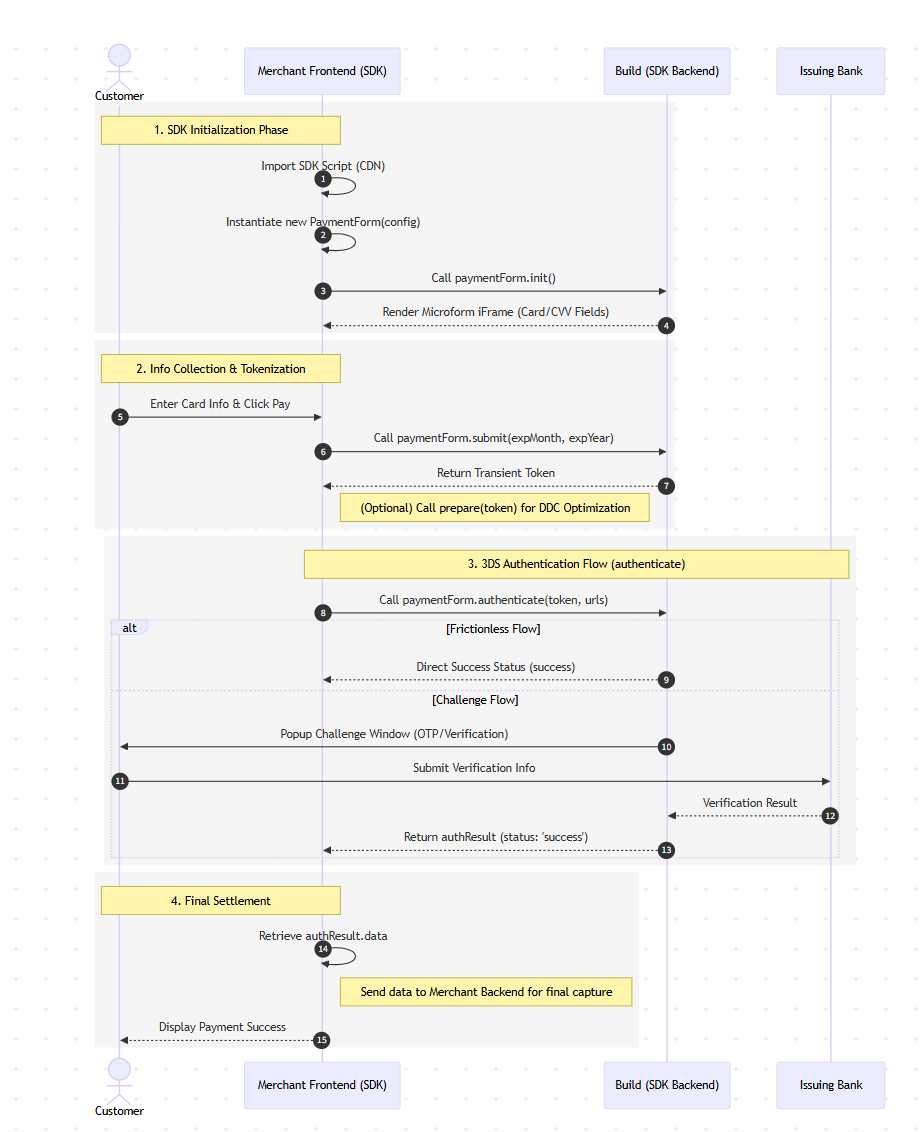
2. Integration Flow
The integration follows a four-phase process:
Preparation: Merchant server calls Acquiring Server to get a checkout session.
SDK Initialization Phase: Import the script, instantiate the
PaymentFormwith the session id, call.init(), and render the Microform iframes.Info Collection & Tokenization: The customer enters card info; the frontend calls
.submit()to receive a Transient Token.3DS Authentication Flow: Call
.authenticate().- Frictionless Flow: Direct success status is returned.
- Challenge Flow: A popup window appears for OTP/Verification; the result is returned after the issuing bank verifies the info.
Final Settlement: Retrieve the authentication result and send data to the merchant backend for final capture.
3. Quick Start
3.1 Import the SDK
Currently, only the Sandbox environment is available for integration testing. Use a <script> tag as no NPM package is provided.
<script src="https://asset.sandbox.build.app/sdk/payment-form.js"></script>
To avoid cached versions, load the script with a timestamp parameter: https://asset.sandbox.build.app/sdk/payment-form.js?t={timestamp}. Use the https://asset.build.app domain when deploying to production.
Upon loading, the PaymentForm class is attached to the global window object.
3.2 Prepare HTML Containers
Create containers for the card number, CVV, and expiration date.
<form id="paymentForm">
  <div class="form-group">
    <label>Card Number</label>
    <div id="cardNumber" class="field-container"></div>
  </div>

  <div class="form-group">
    <label>CVV</label>
    <div id="cvv" class="field-container"></div>
  </div>

  <div class="form-group">
    <label>Expiration Date</label>
    <div style="display: flex; gap: 10px;">
      <select id="expMonth">
        <option value="01">01</option>
        </select>
      <select id="expYear">
        </select>
    </div>
  </div>
  <button type="submit" id="submitBtn">Pay</button>
</form>
3.3 Initialize the SDK
Instantiate the form and call init().
const paymentForm = new PaymentForm({
      env: 'sandbox', // option: 'prod' | 'sandbox' | 'test'
      theme: 'auto', // option: 'light' | 'dark' | 'auto' (follow system)
      checkout_session_id: checkoutSessionId,
      captureContextParams: {
        hosted_origin: [window.location.origin],
        card_networks: ['VISA', 'MASTERCARD', 'AMEX'],
        reference_id: crypto.randomUUID(),
      },
      billing_info: {
        address: {
          country_code: 'AU',
          state: 'NSW',
          city: 'Sydney',
          address_line1: 'Level 29',
          address_line2: 'Chifley Tower',
          address_line3: '2 Chifley Square',
          postal_code: '2000',
        },
        first_name: 'William',
        last_name: 'Davis',
        middle_name: 'Kevin',
        email: 'will@google.com',
        phone_number: '+61 423 555 123',
      },
      shipping: {
        address: {
          country_code: 'AU',
          state: 'NSW',
          city: 'Sydney',
          address_line1: 'Level 29',
          address_line2: 'Chifley Tower',
          address_line3: '2 Chifley Square',
          postal_code: '2000',
        },
        first_name: 'Liam',
        last_name: 'Smith',
        middle_name: 'Kevin',
        carrier: 'UPS',
        phone_number: '+61 423 555 123',
      },
      product_items: [
        {
          product_name: 'pen',
          description: 'a pen for gentlemen',
          quantity: 2,
          unit_cost: 200,
          payment_method_options: {
            commodity_category: 'D000',
            commodity_type: '01',
          },
          discount_amount: 0,
          product_code: 'merchant-product-sku-1',
          unit_of_measure: 'piece',
        }
      ],
      onSuccess: (token: unknown) => {
        console.log('✅ Sumbit successfully');
        console.log('Token:', token);
      },
      onError: (error: unknown) => {
        console.error('Operation failed', error);
      },
      /*
       optional:
       `true` for redirecting top-level page to success_url/error_url
       instead of loading inside the iframe overlay
       */
      // redirectMode: true,
    });

    await paymentForm.init();
4. API Reference
4.1 PaymentFormConfig
| Parameter | Type | Required | Description |
|---|---|---|---|
env | 'prod' | 'sandbox' | 'test' | Yes | Environment setting. |
theme | 'light' | 'dark' | 'auto' | No | Theme setting. |
checkout_session_id | string | Yes | Checkout session ID. |
apiBaseUrl | string | No | API endpoint address. |
context | string | Optional* | Pre-generated Capture Context (JWT). |
captureContextParams | object | Optional* | Params to auto-request Capture Context if context is missing. |
billing_info | BillingInfo | No | Recommended. Missing info may cause 3DS failure. |
product_items | ProductItem[] | No | Recommended. Missing info may cause 3DS failure. |
selectors | object | No | DOM selectors for iframes (Default: #cardNumber, #cvv). |
challengeWindowSize | '01'-'05' | No | 3DS window size. '05' is fullscreen (default). |
redirectMode | boolean | No | When true, redirects the top-level page to success_url or error_url after authentication instead of loading them inside the iframe overlay. |
*Either context or captureContextParams must be provided.
Types:
interface BillingInfo {
  address: {
    country_code?: string;
    state?: string;
    city?: string;
    address_line1?: string;
    address_line2?: string;
    address_line3?: string;
    postal_code?: string;
  };
  first_name?: string;
  last_name?: string;
  middle_name?: string;
  phone_number?: string;
  email?: string;
}

interface ProductItem {
  product_name: string;
  description?: string;
  quantity: number;
  unit_cost: number;
  payment_method_options?: {
    commodity_category?: string;
    commodity_type?: string;
  };
  discount_amount?: number;
  product_code?: string;
  unit_of_measure?: string;
}
4.2 Methods
init(): Promise<void>: Initializes the SDK and loads security iframes.submit(expMonth, expYear): Promise<string>: Submits encrypted info to get a Transient Token.authenticate(token, urls): Promise<AuthResult>: Performs 3DS authentication.prepare(token): Promise<void>: Advanced. Triggers DDC early to optimize performance.
5. build-3ds SDK
Use build-3ds.js when the merchant page only needs to run standalone 3DS browser steps, without loading the full PaymentForm SDK.
5.1 Import the SDK
<script src="https://asset.sandbox.build.app/sdk/build-3ds.js"></script>
Use https://asset.build.app/sdk/build-3ds.js for production.
To avoid cached versions, load the script with a timestamp parameter: https://asset.sandbox.build.app/sdk/build-3ds.js?t={timestamp}.
Upon loading, the SDK is attached to the global window.Build3DS object.
5.2 Device Data Collection
Call Build3DS.collect3DSFingerprint() with the reference_id and data_collection_info returned by the acquiring server.
Pass the returned values directly. The merchant page does not need to decode, inspect, or construct data_collection_info.
Example:
await Build3DS.collect3DSFingerprint({
  reference_id: setupResponse.reference_id,
  data_collection_info: setupResponse.data_collection_info,
});
Signature:
Build3DS.collect3DSFingerprint(params: {
  reference_id: string;
  data_collection_info: string;
}): Promise<void>;
5.3 Challenge
Call Build3DS.performChallenge() with the reference_id and verify_data returned by the acquiring server.
Pass the returned values directly. The merchant page does not need to decode, inspect, or construct verify_data.
Example:
await Build3DS.performChallenge({
  reference_id: verifyResponse.reference_id,
  verify_data: verifyResponse.verify_data,
});
Signature:
Build3DS.performChallenge(params: {
  reference_id: string;
  verify_data: string;
}): Promise<void>;
The SDK validates that the returned fields are present and non-empty. It does not validate provider-specific token formats.
6.Sandbox Testing Card Information
| Scenario / Expected Result | Card Brand | Card Number | CVV |
|---|---|---|---|
| Frictionless Flow | Visa | 4111 1111 1111 1111 | Any |
| Challenge Flow | Visa | 4000 0000 0000 2503 | Any |
- CVV: Any 3 digits.
- Expiry: Any future date.
7. FAQ
- Q: Why do I see "No capture context provided" during init?
- A: Check if
contextorcaptureContextParamsis in your config. Ensurecheckout_session_idis correct. - Q: Why is there no response after a 3DS challenge?
- A: Ensure
billing_infois complete andreturnUrlOriginmatcheswindow.location.origin. - Q: How do I style the input fields?
- A: Use the
fieldConfigparameter or apply CSS directly to the.field-container.