Capture Payment
Capture funds from a previously authorized payment. After a successful capture, the cardholder's account is actually charged and the funds enter the clearing pipeline.
When to Use
- You placed a pre-authorization (
payment_type=AUTH) and are now ready to charge the customer - After fulfilment / shipping confirmation
- After internal approval workflow
Do not use this endpoint when:
- The payment was a direct charge (
payment_type=DEBIT) — those are charged immediately - You want to release the authorization without charging → use Cancel Payment
- The authorization has expired or the payment is already captured
Endpoint
POST https://api.sandbox.build.app/api/v1/acq/payment/{payment_id}/capture
Integration Flow
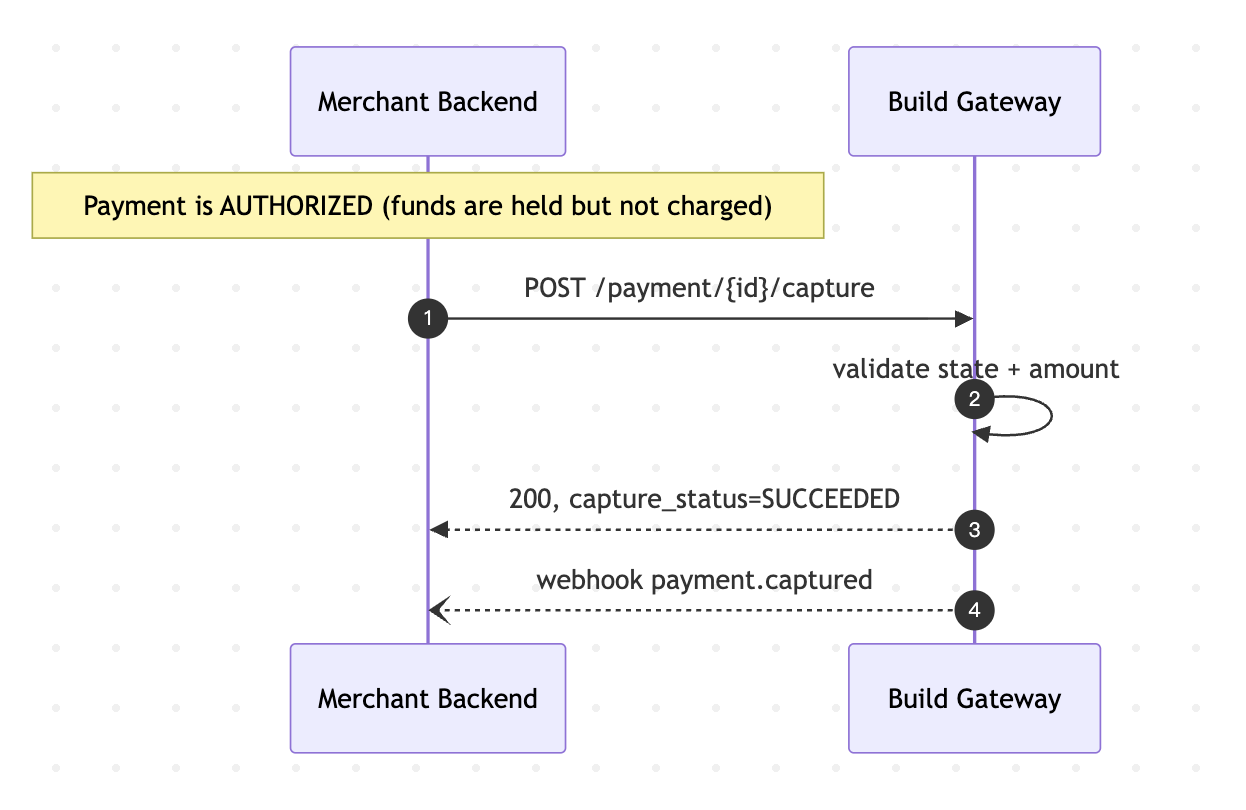
A capture is an asynchronous settlement on the acquirer side but the API response returns synchronously once the capture is accepted. Final settlement outcome is communicated through webhooks and settlement reports.
State Transitions
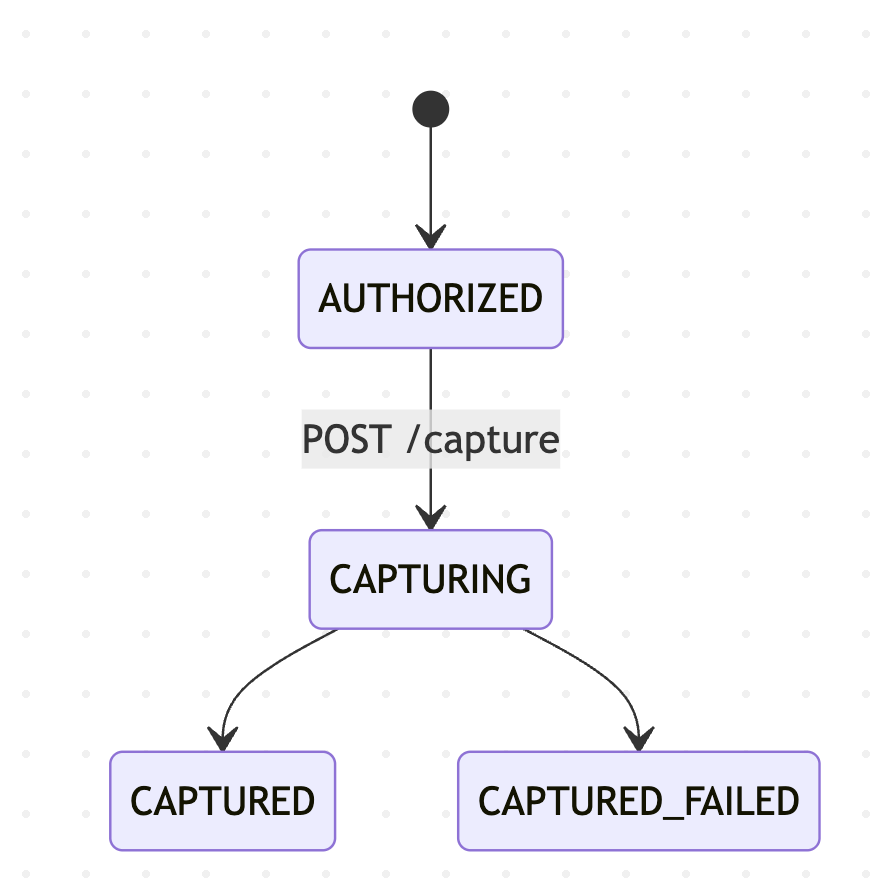
After a successful capture, the parent Payment transitions:
- Full capture →
payment_status = CAPTURED - Partial capture →
payment_status = PARTIALLY_CAPTURED(future versions)
Best Practices
- Always pass
merchant_request_id. It is your idempotency key; retries with the same value return the first response within the 24-hour window. - Verify the Payment state before capturing. Query the Payment; ensure it is
SUCCEEDED. A payment that is inPROCESSINGorREQUIRES_ACTIONis not ready to capture. - Capture within the authorization window. Authorizations expire after a network-defined window (commonly 7 days, sometimes 30). After that the capture will fail even if no other party cancelled the payment.
- Use partial capture for staged fulfilment. When only part of the order ships, capture just that amount — the remainder is automatically released by the card network.
- Reconcile via webhooks, not polling.
CAPTUREevent is fired on successful clearing. Treat the webhook as the source of truth. - Handle soft declines. Some captures can fail at settlement (insufficient funds at time of capture, expired card, etc.). Your system should gracefully surface these to operations for manual follow-up.
ℹ️ Capture limits (current version). The current API accepts a single capture per payment. Multiple partial captures against the same authorization are planned for a future release.
FAQ
Q: What happens to the unused portion of a partial capture? A: It is automatically released by the card network. You do not need to call cancel for the remainder.
Q: Can I capture more than the authorized amount? A: No. Overcapture is disallowed. Create a new payment for any additional amount.
Q: Why did my capture succeed but the settlement report shows a different amount? A: Settlement shows the net amount after fees. Check the fee fields in the settlement record for the breakdown.
Q: My capture returned CAPTURED but the customer says the charge didn't hit their statement for 2 days. Is something wrong? A: No. Capture enters the clearing pipeline immediately, but cardholder statements can lag 1–3 business days depending on the issuer. As long as the webhook payment.captured was delivered, the capture was accepted.
Q: How do I know when multiple partial captures will be supported? A: Monitor release notes. The current API contract reserves the amount field for this future extension; existing single-capture integrations will remain compatible.
Q: Do I need to capture manually for payment_type=DEBIT? A: No. DEBIT payments are captured automatically at the time of authorization. Only AUTH payments require an explicit capture.
Next Steps
- Cancel Payment — release the authorization without charging
- Refund Payment — return funds to the cardholder after a successful capture
- Create Payment — how to authorize a payment in the first place