Create Payment
Create a Payment — the primary endpoint for charging a customer. One endpoint serves two modes:
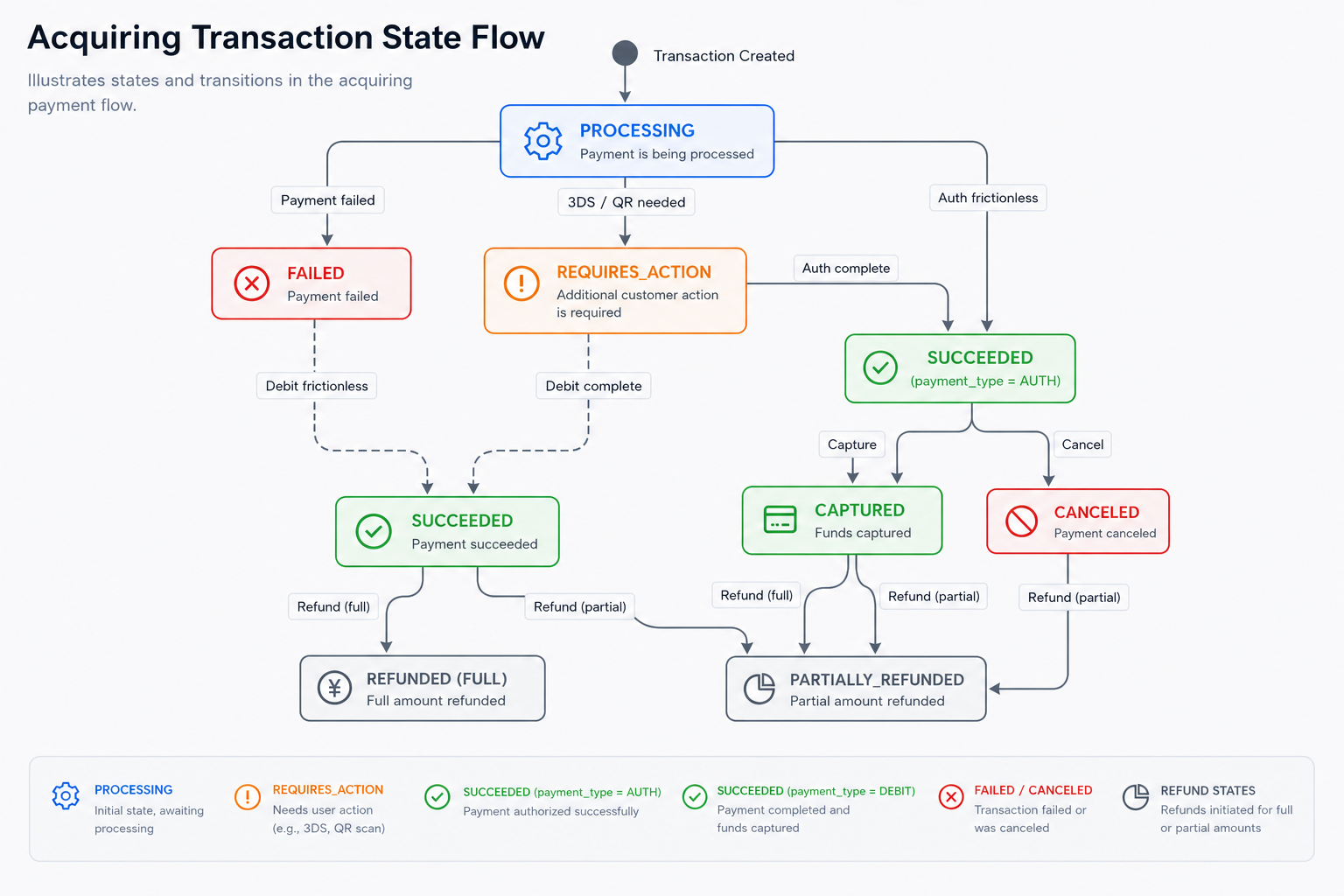
payment_type=DEBIT— immediate charge (funds captured right away)payment_type=AUTH— pre-authorization (funds held; capture later via Capture Payment)
This endpoint also unifies multiple payment methods: cards (with optional 3DS), wallets (Binance Pay, Alipay+), and tokens (one-time tokens produced by your frontend SDK).
When to Use
- Charging a customer for a purchase (
DEBIT) - Reserving funds before fulfilment (
AUTH+ later Capture) - Resuming a paused 3DS challenge (pass
three_ds_info.paused_payment_id) - Creating a wallet / QR-based payment (Binance Pay, Alipay+)
Endpoint
Two versions are available. V2 is recommended for new integrations — 3DS is built in, so no separate /3ds/setup call or SDK iframe is required. V1 remains available for existing SDK-based integrations.
POST https://api.sandbox.build.app/api/v2/acq/payment
POST https://api.sandbox.build.app/api/v1/acq/payment
Choose Your Version
| Aspect | V2 (Recommended) | V1 (Legacy) |
|---|---|---|
| 3DS integration | Inline — device_info passed server-side | Separate /3ds/setup call + frontend SDK |
| Frontend SDK | Not required | Required (iframe fingerprinting) |
| Integration steps | 1 call | 3 steps (setup → fingerprint → payment) |
| Endpoint | POST /api/v2/acq/payment | POST /api/v1/acq/payment |
| Best for | New integrations | Existing SDK-based integrations |
Integration Flow
Card payment · V2
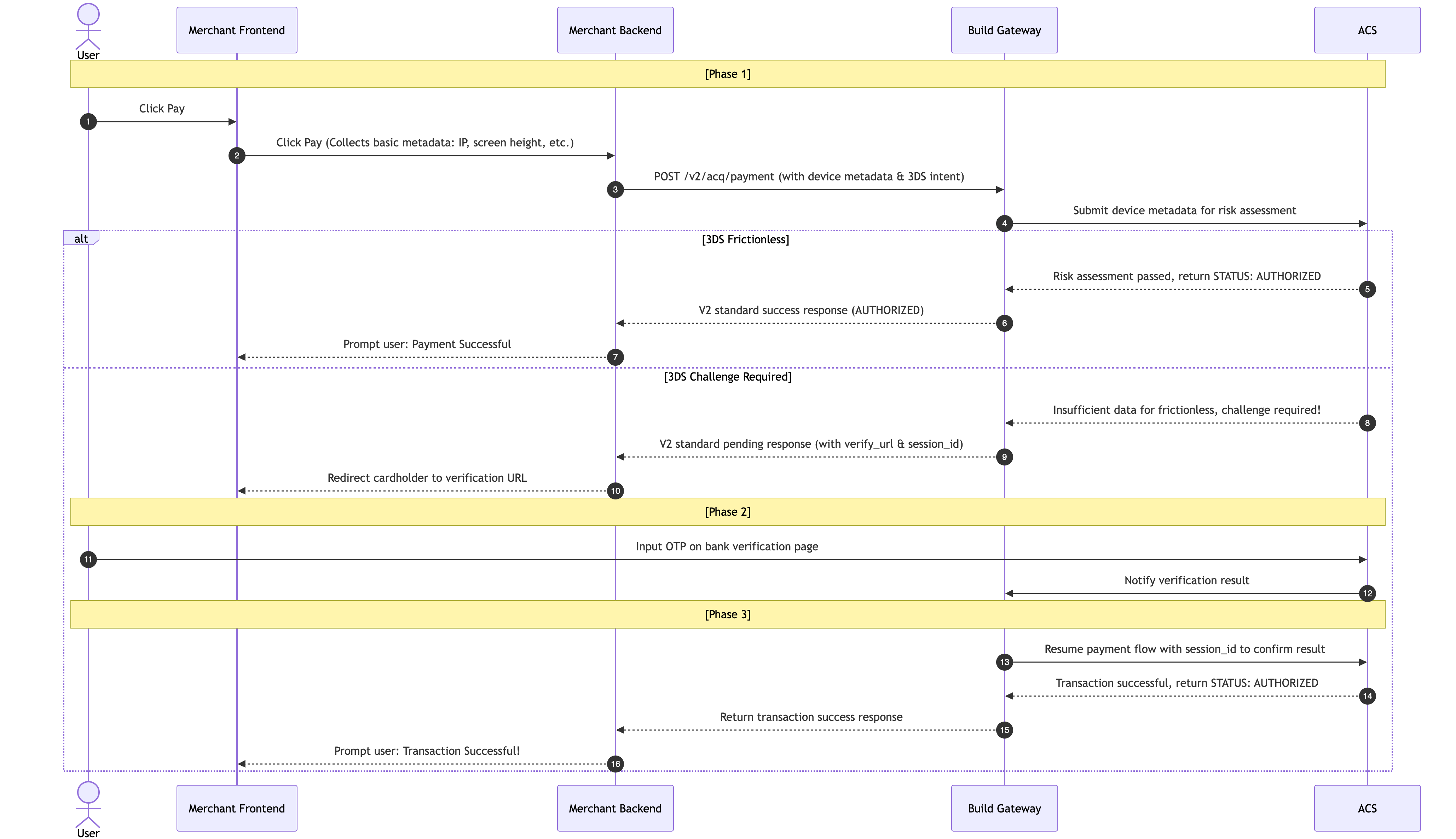
Card payment with 3DS (full flow)
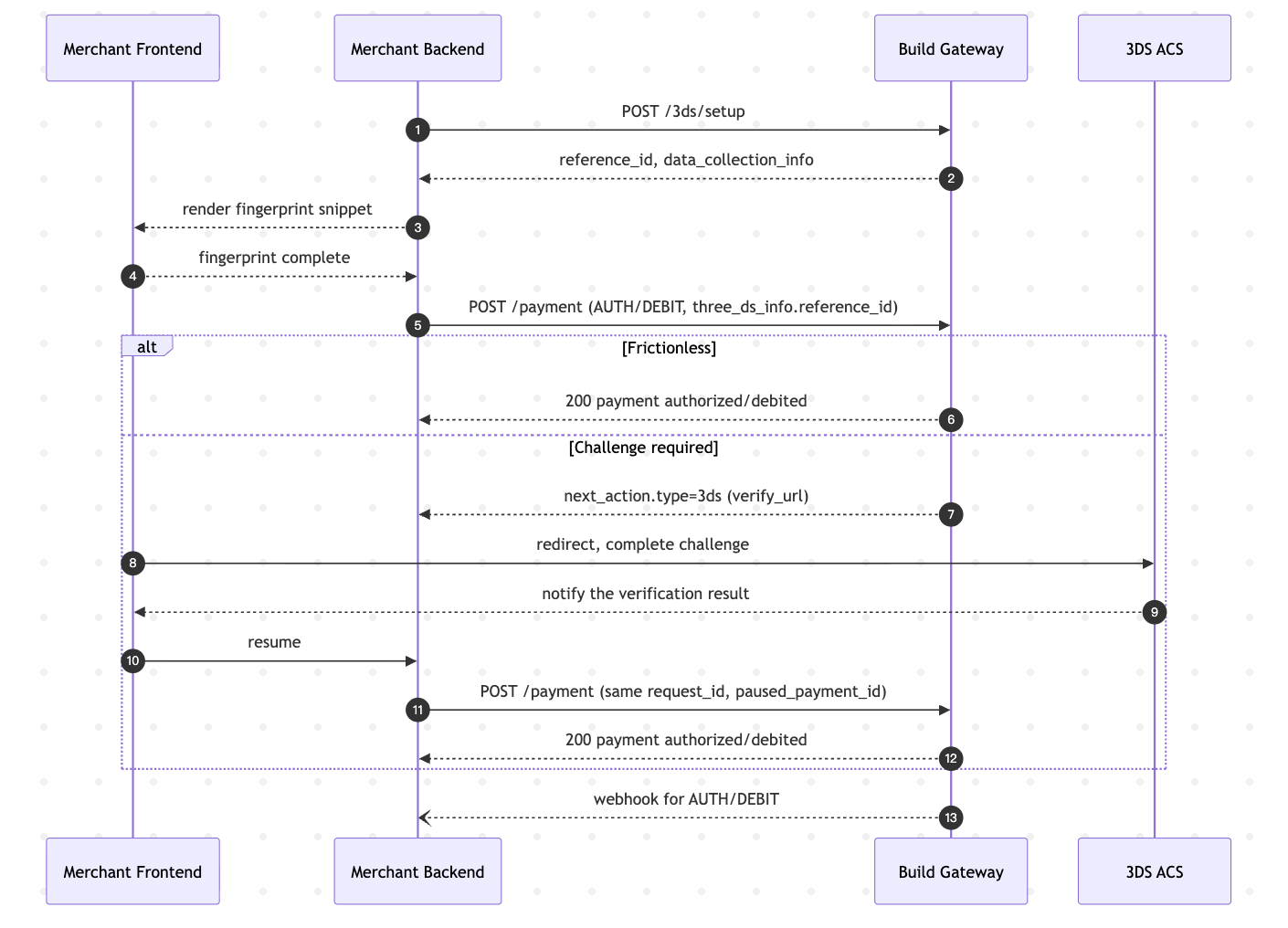
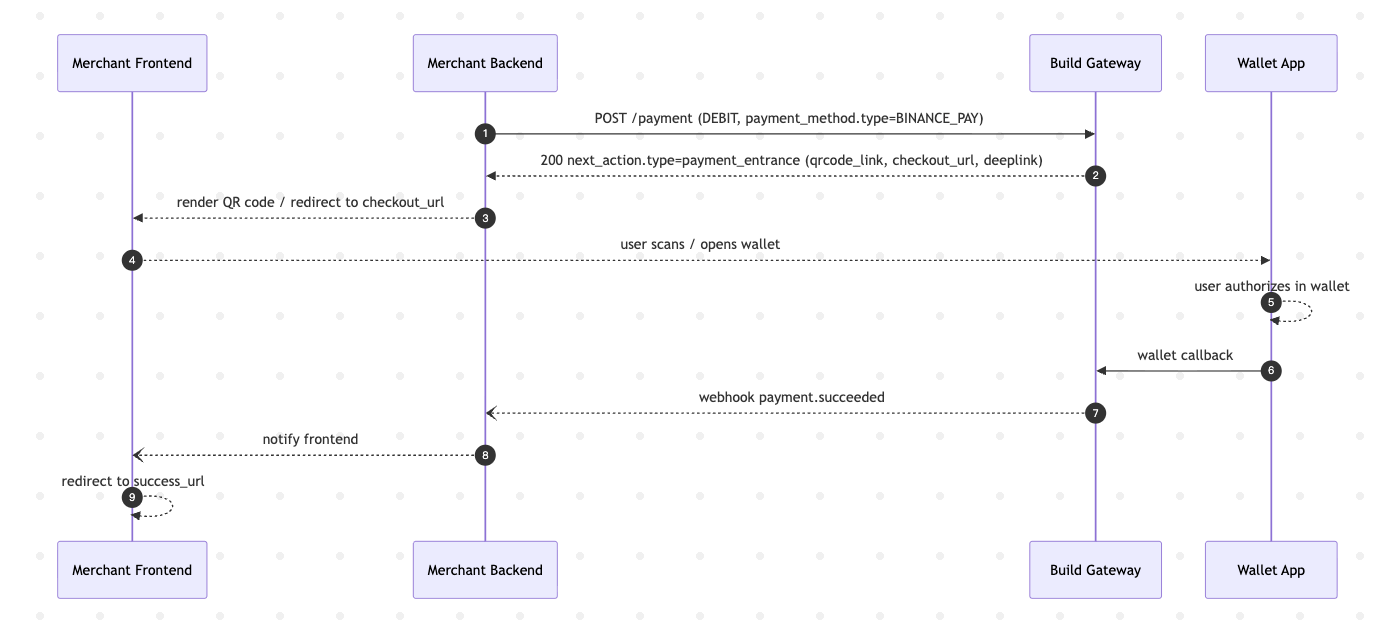
Wallet / QR payment (Binance Pay, Alipay+)
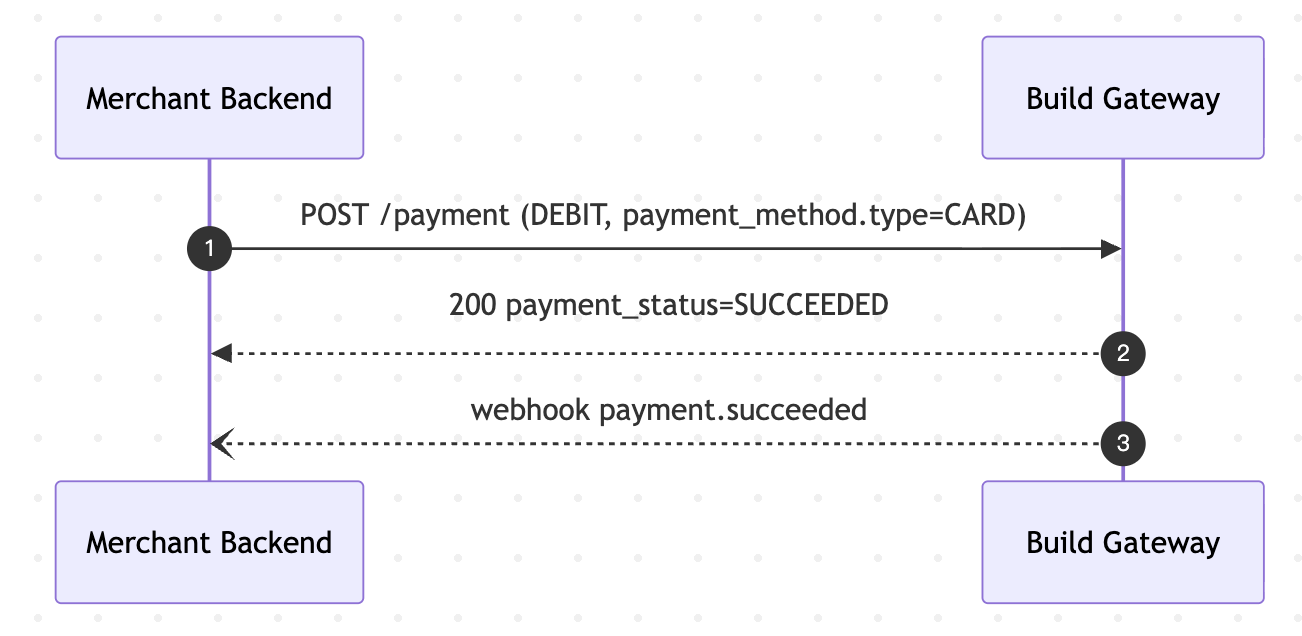
Simple card payment (no 3DS)
State Transitions
Currency Reference
All monetary amount fields in the API must be passed as integers in the smallest unit (minor unit) of the currency. The decimal scaling follows the currency's defined precision (ISO 4217).
Critical Rule
- If the actual amount is 10.51 AUD, send
1051(10.51 × 100).- If the actual amount is 100 JPY (zero-decimal), send
100as-is.- If the actual amount is 1.500 BHD (three-decimal), send
1500(1.5 × 1000).- Never send decimals or strings — always integer in minor units.
Conversion Rule
The integer transmitted = actual amount × 10^decimal_places. The receiving system divides it back when displaying.
// Examples
{ "amount": 1051,  "currency": "AUD" }   // ✓ Actual: 10.51 AUD  (2 decimals → x100)
{ "amount": 10000, "currency": "AUD" }   // ✓ Actual: 100.00 AUD
{ "amount": 100,   "currency": "JPY" }   // ✓ Actual: 100 JPY    (0 decimals → x1)
{ "amount": 1500,  "currency": "BHD" }   // ✓ Actual: 1.500 BHD  (3 decimals → x1000)
{ "amount": 100500000, "currency": "USDT" } // ✓ Actual: 100.500000 USDT (6 decimals → x1,000,000)

{ "amount": "10.51",  "currency": "AUD" }   // ✗ rejected (string with decimal)
{ "amount": 10.51,    "currency": "AUD" }   // ✗ rejected (float not allowed)
Primary Currencies (Most Common)
| Currency | ISO Code | Numeric | Symbol | Decimal Places | API Example Amount | Actual Amount |
|---|---|---|---|---|---|---|
| Australian Dollar | AUD | 036 | A$ | 2 | 1051 | 10.51 |
| US Dollar | USD | 840 | $ | 2 | 1051 | 10.51 |
| Chinese Yuan | CNY | 156 | ¥ | 2 | 1051 | 10.51 |
| Philippine Peso | PHP | 608 | ₱ | 2 | 1051 | 10.51 |
| Malaysian Ringgit | MYR | 458 | RM | 2 | 1051 | 10.51 |
| Singapore Dollar | SGD | 702 | S$ | 2 | 1051 | 10.51 |
| Hong Kong Dollar | HKD | 344 | HK$ | 2 | 1051 | 10.51 |
| Euro | EUR | 978 | € | 2 | 1051 | 10.51 |
| British Pound | GBP | 826 | £ | 2 | 1051 | 10.51 |
Zero-Decimal Currencies
Pass the integer as-is. No multiplication needed.
| Currency | ISO Code | Numeric | Symbol | Decimal Places | API Example Amount | Actual Amount |
|---|---|---|---|---|---|---|
| Japanese Yen | JPY | 392 | J¥ | 0 | 100 | 100 |
| Indonesian Rupiah | IDR | 360 | Rp | 0 | 50000 | 50000 |
| Vietnamese Dong | VND | 704 | ₫ | 0 | 100000 | 100000 |
| Korean Won | KRW | 410 | ₩ | 0 | 1000 | 1000 |
Three-Decimal Currencies
Multiply actual amount × 1000 to get the integer.
| Currency | ISO Code | Numeric | Symbol | Decimal Places | API Example Amount | Actual Amount |
|---|---|---|---|---|---|---|
| Bahraini Dinar | BHD | 048 | .د.ب | 3 | 1500 | 1.500 |
| Jordanian Dinar | JOD | 400 | JD | 3 | 1500 | 1.500 |
| Omani Rial | OMR | 512 | ر.ع. | 3 | 1500 | 1.500 |
| Iraqi Dinar | IQD | 368 | د.ع | 3 | 1000000 | 1000.000 |
| Libyan Dinar | LYD | 434 | LD | 3 | 1500 | 1.500 |
Other Supported Currencies (2 Decimals)
Multiply actual amount × 100 to get the integer.
| Currency | ISO Code | Numeric | Symbol | Decimal Places | API Example Amount | Actual Amount |
|---|---|---|---|---|---|---|
| Indian Rupee | INR | 356 | ₹ | 2 | 1051 | 10.51 |
| Thai Baht | THB | 764 | ฿ | 2 | 1051 | 10.51 |
| Mexican Peso | MXN | 484 | Mex$ | 2 | 1051 | 10.51 |
| New Zealand Dollar | NZD | 554 | NZ$ | 2 | 1051 | 10.51 |
| Turkish Lira | TRY | 949 | ₺ | 2 | 1051 | 10.51 |
| UAE Dirham | AED | 784 | د.إ | 2 | 1051 | 10.51 |
| Canadian Dollar | CAD | 124 | C$ | 2 | 1051 | 10.51 |
| South African Rand | ZAR | 710 | R | 2 | 1051 | 10.51 |
| Pakistani Rupee | PKR | 586 | P.Rs. | 2 | 1051 | 10.51 |
| Brazilian Real | BRL | 986 | R$ | 2 | 1051 | 10.51 |
Crypto Assets
Multiply actual amount by 10^decimal_places to get the integer.
| Asset | Code | Decimal Places | API Example Amount | Actual Amount |
|---|---|---|---|---|
| Tether USD | USDT | 6 | 100500000 | 100.500000 |
| USD Coin | USDC | 6 | 100500000 | 100.500000 |
Need a currency not listed? Build supports 150+ currencies. Contact your account manager to enable additional currencies for your merchant account. The decimal precision follows the ISO 4217 standard.
Best Practices
merchant_request_idis sacred. Always generate one per intended payment. Mismatched payloads with the same ID returnIDEM_REQ_PARAMS_CHANGED.- Always implement a
next_actionhandler. Even if you think the flow is frictionless, some jurisdictions / issuers force 3DS. Your code must redirect or render QR when told. - Use
AUTH+Capturefor anything involving fulfilment. It lets you charge only when you ship, reducing refunds. - Respect
expire_time. For wallet / QR flows, the entrance URL has a limited lifetime. Show a countdown or offer a refresh action. - Reconcile via webhooks, not polling. Treat
DEBITwebhook as the source of truth. - Pass accurate
billingfor card payments. AVS / 3DS frictionless rates depend heavily on address and email. Sparse billing data means more challenges. - Validate
success_url/cancel_url/error_url. Use HTTPS. Invalid URLs break the post-payment redirect.
FAQ
Q: Can I charge the cardholder without 3DS? A: Depends on the issuer / region. In many regions you can, but the liability for fraud remains on you. Consult your acquiring agreement.
Q: What is the difference between DEBIT and AUTH? A: DEBIT charges immediately — funds leave the customer at authorization time. AUTH places a hold; you must call /capture later to actually take the money, or /cancel to release the hold. Use AUTH whenever there is a fulfilment step.
Q: Can I combine 3DS with DEBIT? A: Yes. 3DS works with both DEBIT and AUTH. The flow is the same: /3ds/setup → /payment.
Q: What does next_action.type=PAYMENT_ENTRANCE mean? A: The payment requires the customer to complete the flow in an external app or QR scan (typical of wallets like Binance Pay and Alipay+). Render the QR / deeplink / redirect to checkout_url and wait for the webhook.
Q: The payment response does not include next_action. Is the payment done? A: Yes. An absent next_action means the payment reached a terminal state for this API call. Check payment_status: SUCCEEDED means success.
Q: My 3DS challenge redirect completed, but the cardholder bounced back and my payment is still REQUIRES_ACTION. What now? A: Resume the payment by calling POST /payment again with the same merchant_request_id and adding three_ds_info.paused_payment_id. Do not create a new payment.
Q: Can I pass my own payment_id? A: No. payment_id is generated by Build. Use order_reference and merchant_request_id for your own identifiers.
Q: What is the maximum amount? A: Depends on your merchant limits and the payment method.
Q: Is there a test mode for BINANCE_PAY / ALIPAY_PLUS_PAY? A: Yes — the sandbox environment simulates wallet callbacks. See the sandbox guide for trigger values.
Next Steps
- 3DS Setup — the preceding step for card payments that require 3DS
- Capture Payment — capture funds on an
AUTHpayment - Cancel Payment — release an
AUTHpayment - Refund Payment — return funds to the cardholder