Refund Payment
Refund a captured or successful payment, either fully or partially. Funds are returned to the original payment instrument.
When to Use
- The customer requested a refund after receiving (or not receiving) the goods or service
- Fraud or chargeback prevention — proactive refund before the cardholder disputes
- Duplicate charge reversal
Do not use this endpoint when:
- The payment is still authorized but not captured → use Cancel Payment (faster, no fees)
- The payment itself failed (
payment_status=FAILED) — there is nothing to refund
Endpoint
POST https://api.sandbox.build.app/api/v1/acq/payment/{payment_id}/refund
Integration Flow
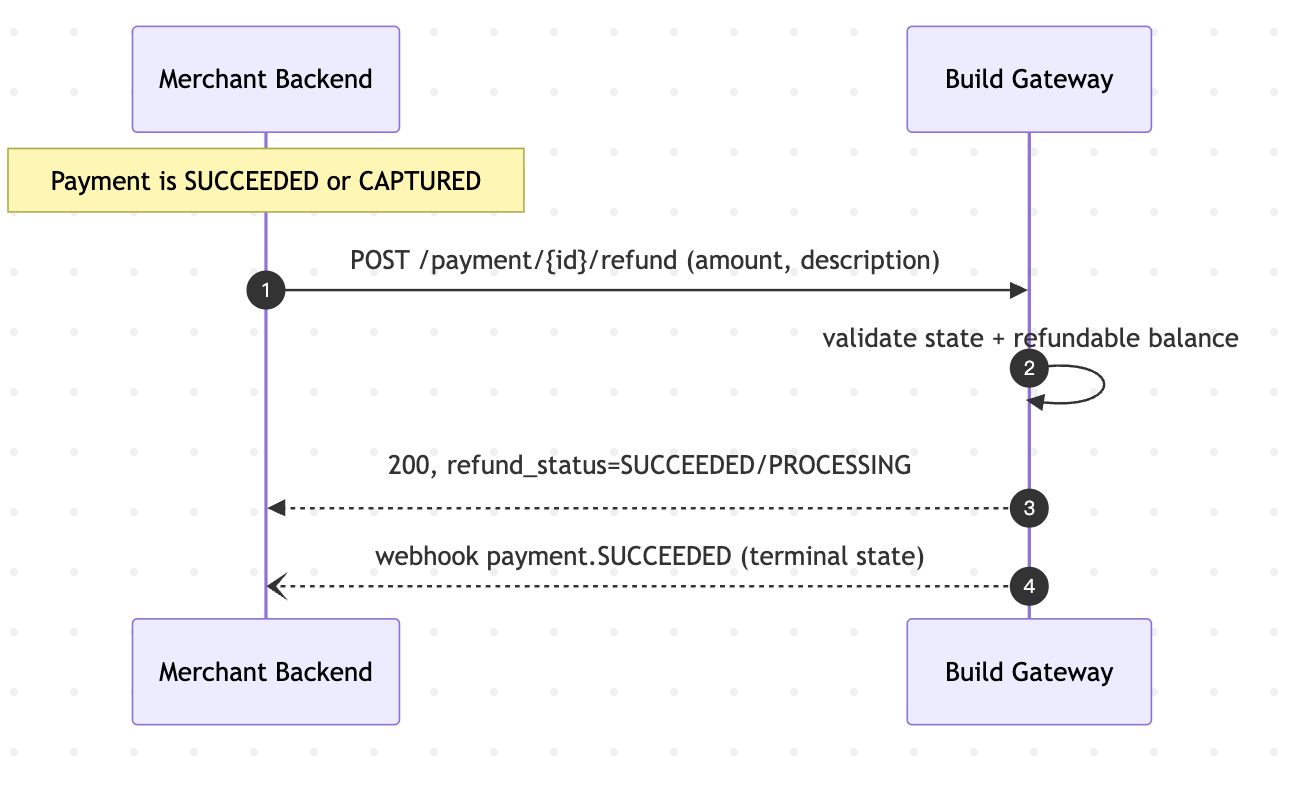 Typical timeline to funds availability
| Payment method | Typical refund time |
|---|---|
CARD (credit / debit) | 1–5 business days to appear on the cardholder statement |
APPLE_PAY / GOOGLE_PAY | Same as underlying card |
BINANCE_PAY | Minutes to hours (on-chain confirmation) |
ALIPAY_PLUS_PAY | Same as underlying wallet (often same-day) |
The refund API response is typically near-instant (PROCESSING or SUCCEEDED). The time listed above is how long the cardholder waits to see the money back.
State Transitions
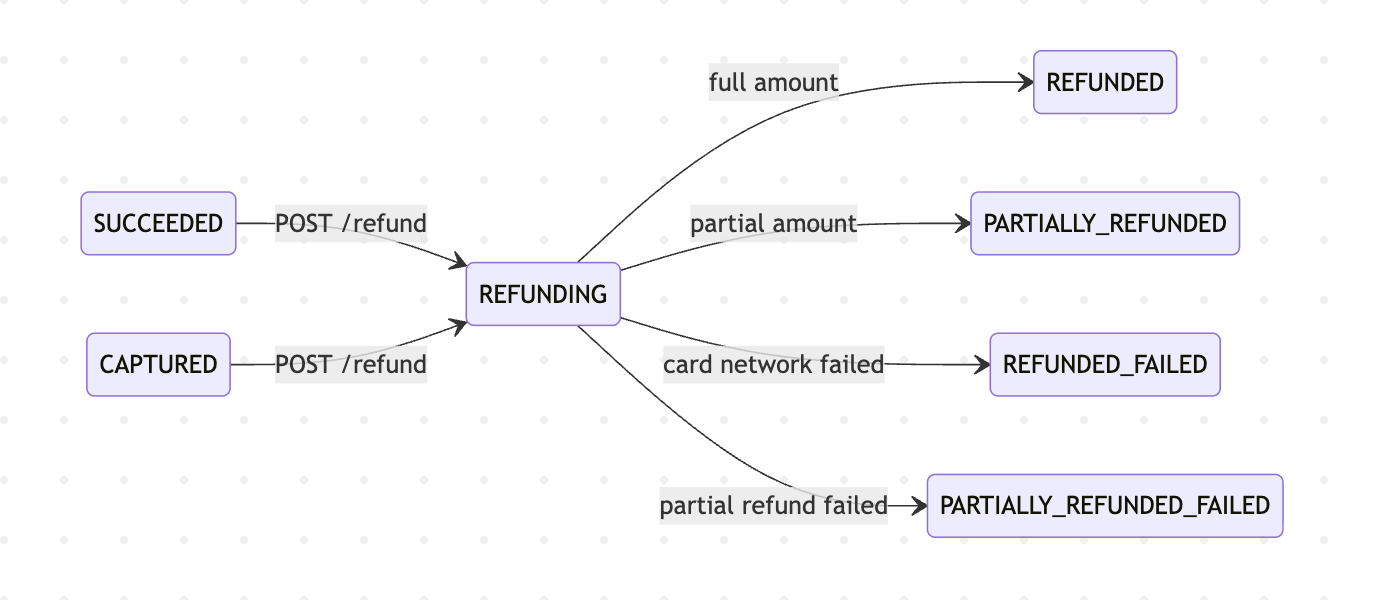
After a successful refund, the parent Payment transitions:
- Full amount refunded →
payment_status = REFUNDED - Partial refund →
payment_status = PARTIALLY_REFUNDED
Best Practices
- Always pass
merchant_request_id. Idempotency is critical to avoid double-refunds. Retries with the same value return the first response within the 24-hour window. - Query the payment first. Before refunding, verify the payment status and remaining refundable balance. Do not assume.
- Prefer Cancel over Refund when possible. If the payment is not still
CAPTURED, a cancel is instant and does not generate a pair of statement entries for the cardholder. - Set
descriptionresponsibly. For card networks, the description may surface to the cardholder's bank statement. - Reconcile via webhooks.
REFUNDwebhook is fired on terminal success. For synchronous card refunds the webhook fires within seconds. - Plan for failure modes. A refund can fail at the instrument level (closed bank account, expired card). Your operations flow should have a fallback (store credit, manual transfer).
- Track
refund_id, not justpayment_id. When you need to reconcile with settlement reports, therefund_idis the atomic unit.
FAQ
Q: Can I refund more than the original charge? A: No. Refunds cannot exceed the original payment amount (minus any prior refunded amount).
Q: Can I cancel a refund? A: No. Once a refund is submitted, it cannot be recalled through the API. If the refund is still PROCESSING, contact support immediately — there may be a narrow window before the funds leave your settlement account.
Q: My refund returned SUCCEEDED but the cardholder hasn't seen the money. What now? A: Card refunds take 1–5 business days to appear on statements — this is the issuer's pipeline. Wait 7 business days before escalating, and share the refund_id with support when you do.
Q: Do I get back the Payment processing fees when I refund? A: Fee return policy depends on your contract.
Q: Why is my refund still in PROCESSING after an hour? A: For card refunds, this is unusual — contact support. For crypto / on-chain refunds, network congestion can delay confirmation; wait for the webhook.
Q: The original payment method is no longer valid (card expired). Can the refund still succeed? A: In most cases, yes — card networks route refunds to the cardholder even on expired cards. In rare cases you will fail, contact the cardholder for an alternative channel.
Q: How do I refund a payment that is more than 180 days old? A: You cannot refund via the API. Contact support for manual reconciliation.
Q: Can I refund a specific line item of a multi-item order? A: Yes — use a partial refund with the matching amount.
Next Steps
- Cancel Payment — faster alternative for non-captured payments
- Create Payment — how to charge a customer in the first place
- Capture Payment — capture an authorization before refunding