Apple Pay & Google Pay
Accept wallet payments through Apple Pay and Google Pay. Both wallets converge on the same Build endpoints: a wallet-setup call to obtain the front-end configuration (or Apple Merchant Session), and the unified POST /api/v2/acq/payment to submit the wallet token.
Payment methods: APPLE_PAY, GOOGLE_PAY
How It Works
Regardless of wallet, the integration follows one shared model:
- wallet-setup — your backend calls
POST /api/v1/acq/payment/wallet-setupto obtain the front-end configuration (Google) or a verified Merchant Session (Apple Web hosted mode). - Obtain token — the front-end presents the wallet sheet; the user authorizes and a one-time payment token is returned.
- Submit payment — your backend submits the token to
POST /api/v2/acq/paymentwithpayment_method.type = APPLE_PAY | GOOGLE_PAY.
Apple Pay
Prerequisites
The merchant must register the following in the Apple Developer portal:
| Step | Notes |
|---|---|
| Register Apple Developer account | Enterprise account required |
| Create Merchant ID | Format: merchant.com.yourcompany |
| Register & verify domain | Required for Web (host Apple verification file under the domain) |
| Payment Processing Certificate | Used for token decryption (managed by Build) |
| Merchant Identity Certificate | Used for mTLS merchant validation (managed by Build in hosted mode) |
Endpoints
| Endpoint | Purpose | Scenario |
|---|---|---|
POST /api/v1/acq/payment/wallet-setup | Obtain Apple Pay Merchant Session | Web · Hosted |
POST /api/v2/acq/payment | Create payment (submit token) | All scenarios |
Integration Modes
| Mode | When to Use | Merchant Responsibility |
|---|---|---|
| Hosted | Merchant has no mTLS capability | Provide Apple compliance materials to Build; call wallet-setup for the Session |
| Self-managed | Merchant has full mTLS capability | Call Apple directly for the Session; no materials required from Build |
Merchant Materials
Required for hosted mode only. In self-managed mode the merchant holds its own certificates and Sessions, and supplies nothing to Build.
| Material | Format | Purpose |
|---|---|---|
| Merchant Identity Certificate | .p12 + password | mTLS call to Apple to obtain the Session |
| Merchant ID | String | Merchant identifier created in the Apple portal |
| Display Name | String | Merchant name shown on the payment sheet |
| Verified domain list | Domain(s) | Domain(s) of the Web payment initiation page |
Integration Flow
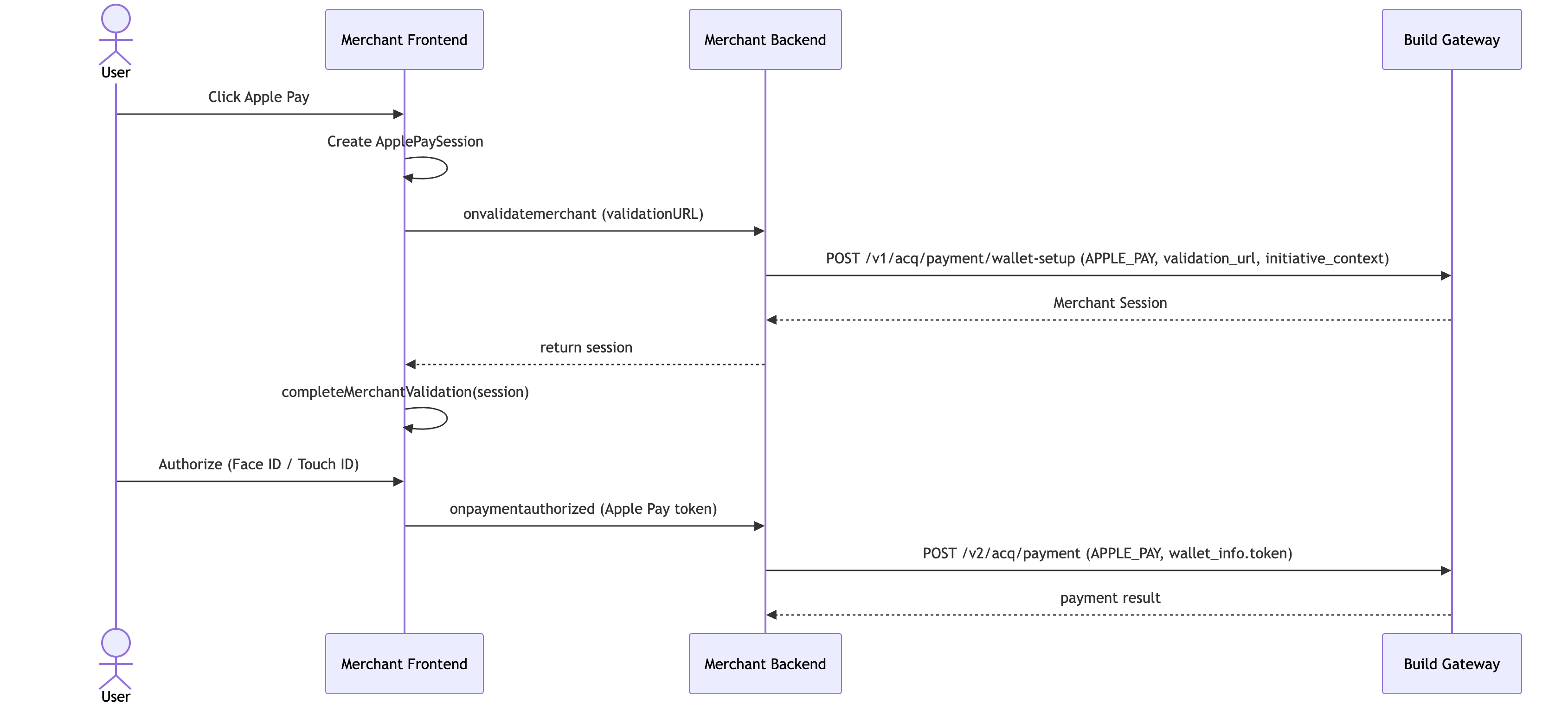
Web · Hosted — Merchant has no mTLS capability and obtains the Session through Build's wallet-setup endpoint. Deploy the Apple verification file at https://{domain}/.well-known/apple-developer-merchantid-domain-association first.
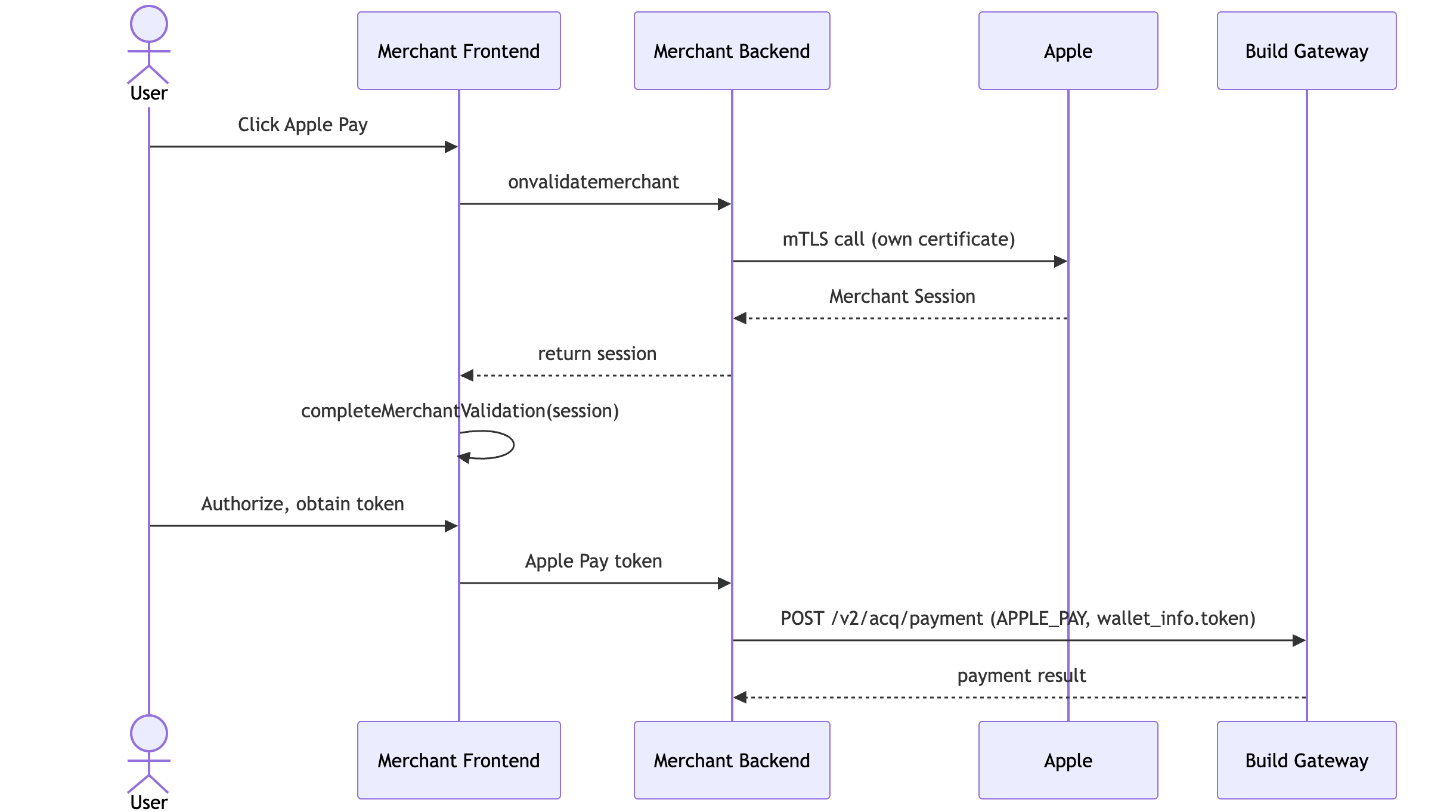
Web · Self-managed — Merchant performs the mTLS call to Apple itself using its own certificate. The wallet-setup endpoint is not used.
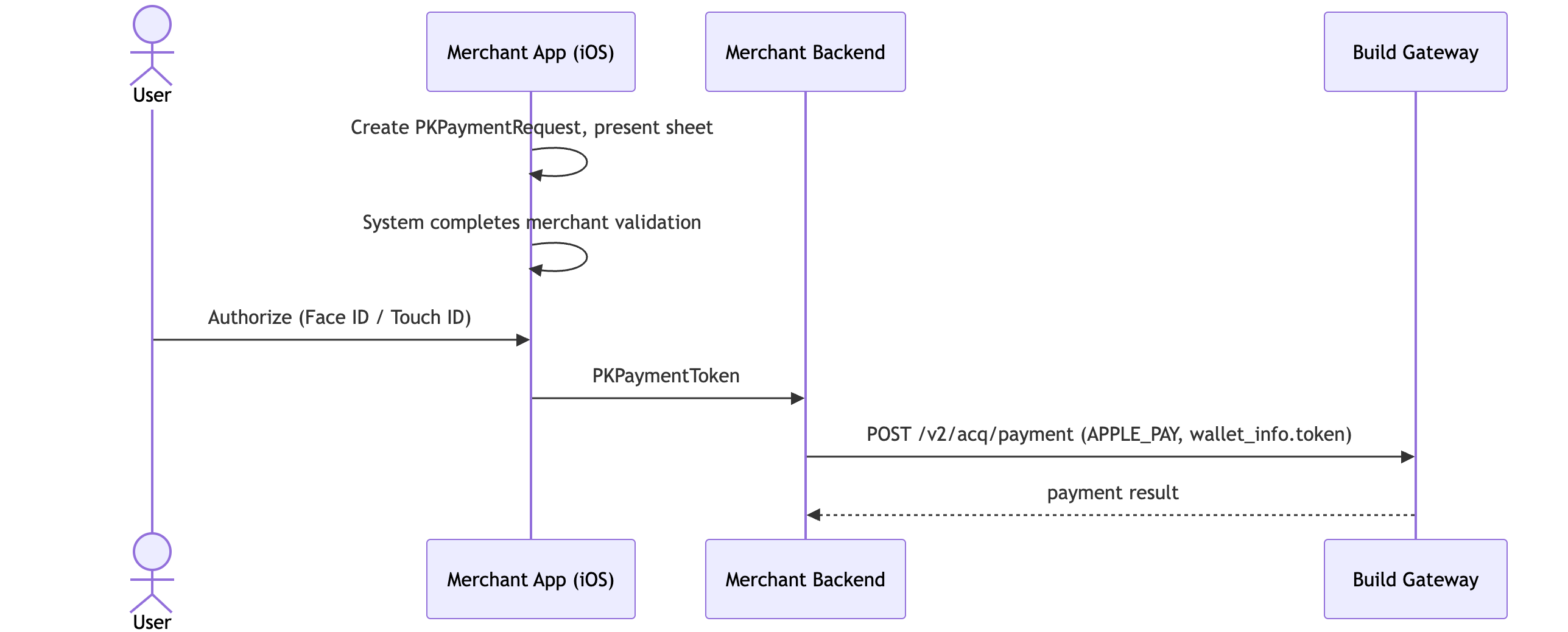
iOS App — Native iOS apps need no Session validation and do not call wallet-setup — the system handles merchant validation automatically.
wallet-setup Example
Request:
{
    "merchant_id": "2010598028485726208",
    "wallet_type": "APPLE_PAY",
    "wallet_context": {
        "validation_url": "https://apple-pay-gateway-cert.apple.com/paymentservices/startSession",
        "initiative_context": "www.merchant.com"
    }
}
Response:
{
    "code": 200,
    "msg": "success",
    "data": {
        "merchant_id": "2010598028485726208",
        "wallet_type": "APPLE_PAY",
        "wallet_context": {
            "epochTimestamp": 1718100000000,
            "expiresAt": 1718103600000,
            "merchantSessionIdentifier": "SSH...",
            "nonce": "abc123",
            "merchantIdentifier": "merchant.com.example",
            "domainName": "www.merchant.com",
            "displayName": "My Shop",
            "signature": "MIIe..."
        }
    }
}
Notes
| Item | Detail |
|---|---|
| Domain consistency | initiative_context must exactly match the payment page domain |
| HTTPS | The payment page must use HTTPS |
| Browser | Web is supported on Safari only |
| Token validity | Single-use; submit the payment immediately after obtaining it |
| Certificate validity | Merchant Identity Certificate valid for 25 months; renew before expiry |
| Test environment | Apple sandbox account + apple-pay-gateway-cert.apple.com |
Google Pay
Prerequisites
The merchant must register in the Google Pay & Wallet Console:
| Step | Notes |
|---|---|
| Register Google Pay Business Console account | https://pay.google.com/business/console |
| Obtain Google Merchant ID | Auto-assigned by the console |
| Submit integration review | Must pass Google review before production go-live |
Endpoints
| Endpoint | Purpose | Scenario |
|---|---|---|
POST /api/v1/acq/payment/wallet-setup | Obtain Google Pay gateway config | All scenarios |
POST /api/v1/acq/3ds/setup | Initialize 3DS verification | 3DS flow |
POST /api/v2/acq/payment | Create payment (submit token) | All scenarios |
Integration Mode
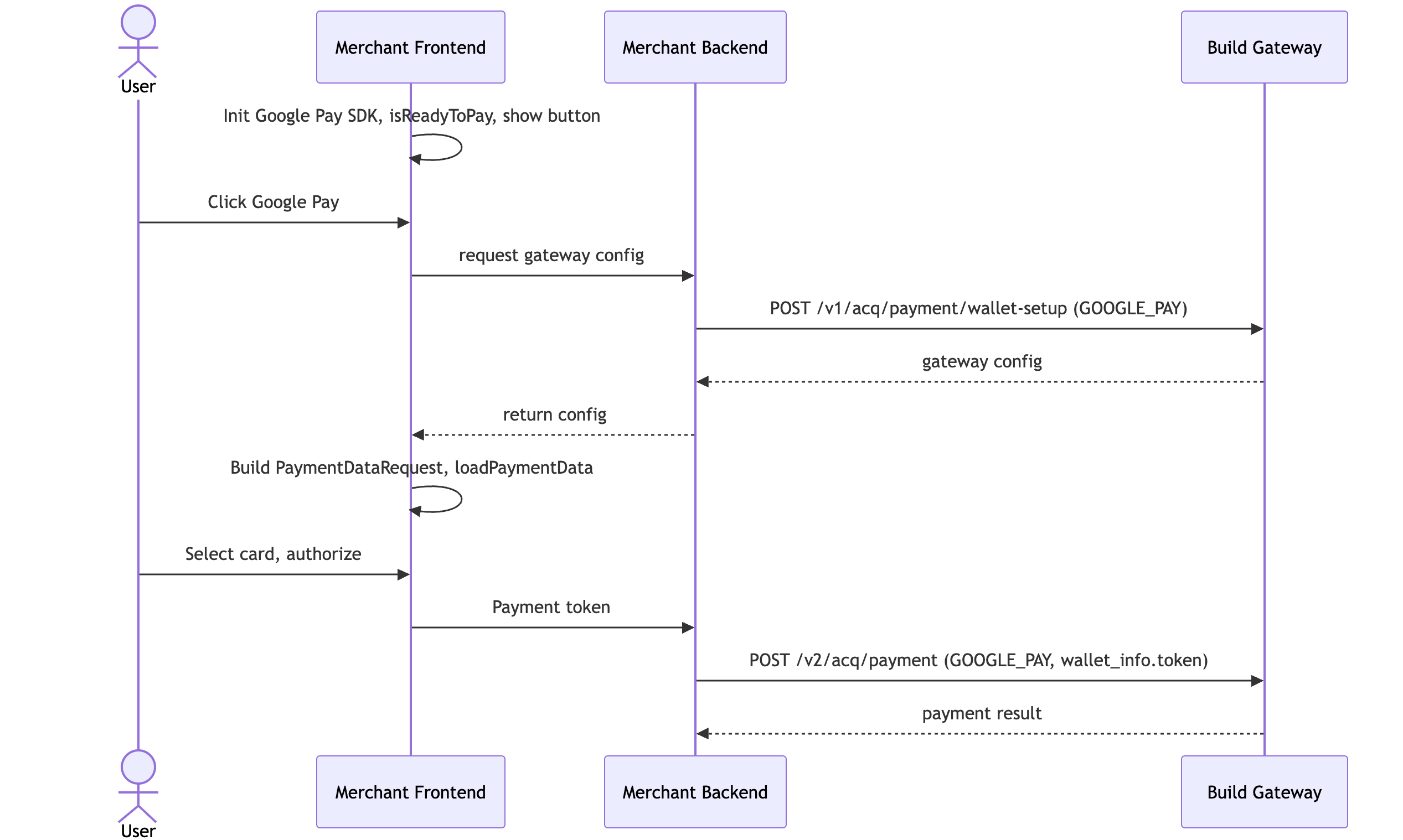
Google Pay supports a single mode: PAYMENT_GATEWAY. Unlike Apple Pay, it requires no mTLS call or Session validation. All merchants obtain the front-end gateway configuration through Build's wallet-setup endpoint.
Merchant Materials
| Material | Format | Notes |
|---|---|---|
| Google Merchant ID | String | Assigned by the Google Pay console (required in production) |
| Merchant Name | String | Merchant name shown on the payment sheet |
Note: In the TEST environment the Google Merchant ID may be omitted — Google does not validate it.
Integration Flow
wallet-setup Example
Request:
{
    "merchant_id": "2010598028485726208",
    "wallet_type": "GOOGLE_PAY",
    "wallet_context": {}
}
Response:
{
    "code": 200,
    "msg": "success",
    "data": {
        "merchant_id": "2010598028485726208",
        "wallet_type": "GOOGLE_PAY",
        "wallet_context": {
            "gateway": "gateway_name",
            "gateway_merchant_id": "8291034",
            "google_merchant_id": "BCR2DN4TXC7I5OZJ",
            "merchant_name": "Shopping",
            "environment": "TEST"
        }
    }
}
Notes
| Item | Detail |
|---|---|
| Environment | TEST allows any Google account; no real card needed |
| Google Merchant ID | Required in production; optional in TEST |
| Token validity | Single-use; submit the payment immediately after obtaining it |
| 3DS | When 3DS is required, call /api/v1/acq/3ds/setup before the payment endpoint |
| Review | Pass Google's integration review checklist before production go-live |
| HTTPS | The payment page must use HTTPS |
Refunds
Wallet payments are refunded exactly like the underlying card — settlement timing follows the card network. Use the standard refund endpoint (see Refund Payment).
FAQ
Q: Why does Apple Pay have two modes but Google Pay only one? Apple requires a verified Merchant Session via mTLS, so Build offers a hosted mode for merchants without mTLS capability. Google Pay uses the PAYMENT_GATEWAY model with no mTLS or Session step, so a single mode covers all merchants.
Q: Why is Apple Pay on Web limited to Safari? The Apple Pay JS API (ApplePaySession) is only available in Safari. iOS apps use the native PKPaymentRequest and have no browser restriction.
Q: Can a wallet token be reused? No. Both Apple Pay and Google Pay tokens are single-use — submit the payment immediately after obtaining the token.
Q: Do I need a real card to test? No. Apple uses a sandbox account; Google's TEST environment accepts any Google account with no real card.